音视频开发实战
第9章:硬件解码优化
| 项目 | 内容 |
|---|---|
| 本章目标 | 掌握硬件解码优化的核心概念和实践 |
| 难度 | ⭐⭐⭐ 较高 |
| 前置知识 | Ch8:直播基础、FFmpeg使用 |
| 预计时间 | 3-4 小时 |
本章引言
本章与项目的关系:
flowchart LR
    subgraph "P3 直播观众端"
        A["Ch7-9 渐进开发"] --> B["📍 Ch9 硬件解码优化"]
    end

    style B fill:#e3f2fd,stroke:#4a90d9,stroke-width:3px
代码演进关系:
flowchart LR
    subgraph "P3 直播观众端"
        A["Ch8 直播协议"] --> B["📍 Ch9 硬件解码"]
        B --> C["Ch10 音视频采集"]
    end

    style B fill:#e3f2fd,stroke:#4a90d9,stroke-width:3px
- 当前阶段:性能优化
- 本章产出:VideoToolbox/VAAPI/NVDEC
本章目标:实现硬件解码播放器,支持 4K@60fps 流畅播放,CPU 占用低于 15%。
前八章完成了完整的播放器系统: - Ch1-Ch4:本地播放基础(同步播放器、工程化、性能分析、卡顿优化) - Ch5:多线程基础 - Ch6-Ch8:网络播放(异步、HTTP、RTMP直播拉流)
在播放端,软件解码在 1080p 场景下 CPU 占用 30-50%,尚可接受。但当分辨率提升到 4K(3840x2160)时:
- 4K 数据量:是 1080p 的 4 倍
- 软件解码 CPU 占用:80-100%,严重卡顿
- 硬件解码 CPU 占用:5-10%,流畅播放
本章将引入硬件解码——利用 GPU 的专用视频解码电路,大幅降低 CPU 负担。
阅读指南: - 第 1-3 节:理解软件解码的瓶颈,硬件解码原理,各平台方案对比 - 第 4-6 节:详细实现 macOS VideoToolbox、Linux VAAPI/NVDEC - 第 7-8 节:硬件解码器封装、零拷贝渲染优化 - 第 9-10 节:性能测试、降级策略、本章总结
目录
- 软件解码的瓶颈:4K 之痛
- 硬件解码原理
- 各平台硬件解码方案
- macOS:VideoToolbox 详解
- Linux:VAAPI 详解
- Linux:NVDEC 详解
- 统一硬件解码器封装
- 零拷贝渲染优化
- 性能测试与对比
- 降级策略与容错
- 本章总结
1. 软件解码的瓶颈:4K 之痛
本节概览:通过实测数据,展示软件解码在 4K 场景下的性能瓶颈。
1.1 视频解码的计算量
视频解码是计算密集型任务,主要开销来自:
| 操作 | 计算复杂度 | 说明 |
|---|---|---|
| 运动补偿 | O(n) | 像素块匹配、插值 |
| IDCT | O(n log n) | 逆离散余弦变换 |
| 去块滤波 | O(n) | 消除块效应 |
| 熵解码 | O(n) | CABAC/CAVLC 解码 |
1.2 不同分辨率的计算量
假设 30fps:
| 分辨率 | 像素数/帧 | 相对计算量 | 1080p 对比 |
|---|---|---|---|
| 720p | 92万 | 1x | 1/2.25 |
| 1080p | 207万 | 2.25x | 1x |
| 4K | 829万 | 9x | 4x |
| 8K | 3318万 | 36x | 16x |
1.3 软件解码实测数据
测试环境:Intel i7-9700K(8核 3.6GHz)
| 分辨率 | 编码 | 帧率 | CPU 占用 | 解码帧率 | 是否流畅 |
|---|---|---|---|---|---|
| 1080p | H.264 | 30 | 35% | 60fps | ✅ |
| 1080p | H.265 | 30 | 55% | 45fps | ✅ |
| 4K | H.264 | 30 | 85% | 35fps | ❌ 卡顿 |
| 4K | H.265 | 30 | 100% | 25fps | ❌ 严重卡顿 |
问题分析: - 4K H.264 软件解码帧率(35fps)低于播放帧率(30fps),勉强能播但无缓冲余量 - 4K H.265 解码帧率(25fps)低于播放帧率,必然卡顿
1.4 为什么硬件解码更快
GPU 有专门的视频解码单元(NVDEC/VideoToolbox/VAAPI):
CPU(软件解码):
通用指令 → 逐个像素计算 → 串行执行

GPU(硬件解码):
专用电路 → 并行处理多个宏块 → 固定功能管线硬件解码优势: - 并行度:同时处理数十个宏块 - 功耗:专用电路比 CPU 省电 50-80% - 延迟:硬件管线固定,延迟可预测
本节小结:4K 软件解码不可行,必须借助硬件解码。下一节介绍硬件解码原理。
2. 硬件解码原理
本节概览:介绍硬件解码的工作原理、显存管理、以及与软件解码的区别。
flowchart TB
    A["压缩数据\nH.264/H.265"] --> B["GPU 视频解码单元"]
    B --> C["显存中的 YUV 帧\nGPU 内存"]
    C --> D["直接渲染\n零拷贝"]
    C --> E["读回系统内存\nCPU 处理"]

    subgraph "GPU 解码管线"
        B1["1. 熵解码 VLD"] --> B2["2. 反量化 IQ"]
        B2 --> B3["3. IDCT"]
        B3 --> B4["4. 运动补偿 MC"]
        B4 --> B5["5. 去块滤波 DF"]
    end

    B -.-> B1

    style A fill:#e3f2fd,stroke:#4a90d9
    style C fill:#e8f5e9,stroke:#5cb85c
    style D fill:#fce4ec,stroke:#e91e63
    style E fill:#fff3e0,stroke:#f0ad4e
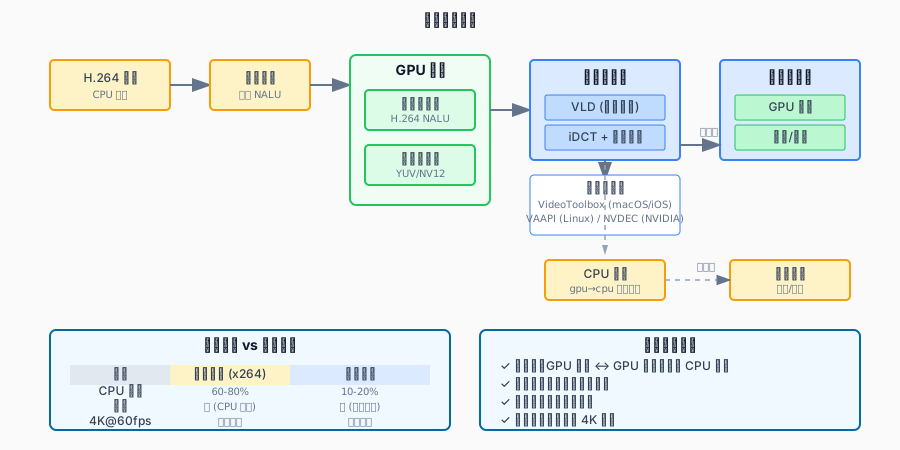
2.1 硬件解码管线
压缩数据 (H.264/H.265)
    ↓
┌─────────────────────────────┐
│      GPU 视频解码单元        │
│  ┌─────────────────────┐    │
│  │ 1. 熵解码 (VLD)     │    │
│  │ 2. 反量化 (IQ)      │    │
│  │ 3. IDCT             │    │
│  │ 4. 运动补偿 (MC)    │    │
│  │ 5. 去块滤波 (DF)    │    │
│  └─────────────────────┘    │
└─────────────────────────────┘
    ↓
显存中的 YUV 帧 (GPU 内存)
    ↓
可选:
  A. 直接渲染(零拷贝)
  B. 读回系统内存 → CPU 处理
2.2 显存 vs 系统内存
| 特性 | 系统内存 (RAM) | 显存 (VRAM) |
|---|---|---|
| 位置 | 主板 | GPU 芯片 |
| 容量 | 16-64 GB | 4-16 GB |
| CPU 访问 | 快 | 慢(需 PCIe) |
| GPU 访问 | 慢 | 快 |
数据拷贝代价: - 1080p YUV420P 帧大小:1920 × 1080 × 1.5 = 3 MB - 4K YUV420P 帧大小:3840 × 2160 × 1.5 = 12 MB - PCIe 带宽:~16 GB/s - 拷贝 4K 帧耗时:12MB / 16GB/s = 0.75ms
2.3 硬件解码 vs 软件解码对比
| 维度 | 软件解码 | 硬件解码 |
|---|---|---|
| 兼容性 | 所有格式 | 有限(需 GPU 支持) |
| 质量 | 最高(算法灵活) | 良好(固定算法) |
| CPU 占用 | 高 | 低(< 15%) |
| 功耗 | 高 | 低 |
| 延迟 | 可变 | 固定 |
| 错误恢复 | 好(可跳过宏块) | 差(可能整帧丢弃) |
本节小结:硬件解码利用 GPU 专用电路,速度快功耗低。主要局限是格式兼容性。下一节介绍各平台方案。
3. 各平台硬件解码方案
本节概览:对比 Windows、macOS、Linux、移动端的主流硬件解码方案。
3.1 方案总览
| 平台 | API | GPU 厂商 | 支持格式 |
|---|---|---|---|
| macOS/iOS | VideoToolbox | Apple | H.264, H.265, ProRes |
| Windows | D3D11VA/DXVA2 | NVIDIA/AMD/Intel | H.264, H.265, VP9, AV1 |
| Linux | VAAPI | Intel/AMD | H.264, H.265, VP8/9 |
| Linux | NVDEC | NVIDIA | H.264, H.265, VP9, AV1 |
| Android | MediaCodec | 各厂商 | H.264, H.265, VP8/9 |
3.2 FFmpeg 硬件解码支持
FFmpeg 提供了统一的硬件解码接口:
// 硬件设备类型枚举
typedef enum AVHWDeviceType {
    AV_HWDEVICE_TYPE_NONE,
    AV_HWDEVICE_TYPE_VDPAU,        // Linux NVIDIA (旧)
    AV_HWDEVICE_TYPE_CUDA,         // NVIDIA NVDEC
    AV_HWDEVICE_TYPE_VAAPI,        // Linux Intel/AMD
    AV_HWDEVICE_TYPE_DXVA2,        // Windows
    AV_HWDEVICE_TYPE_QSV,          // Intel QuickSync
    AV_HWDEVICE_TYPE_VIDEOTOOLBOX, // macOS/iOS
    AV_HWDEVICE_TYPE_D3D11VA,      // Windows
    AV_HWDEVICE_TYPE_DRM,          // Linux DRM
    AV_HWDEVICE_TYPE_OPENCL,
    AV_HWDEVICE_TYPE_MEDIACODEC,   // Android
} AVHWDeviceType;
3.3 解码器名称对照
| 编码 | 软件解码器 | VideoToolbox | VAAPI | NVDEC |
|---|---|---|---|---|
| H.264 | h264 | h264_videotoolbox | h264_vaapi | h264_nvdec |
| H.265 | hevc | hevc_videotoolbox | hevc_vaapi | hevc_nvdec |
| VP9 | vp9 | - | vp9_vaapi | vp9_nvdec |
| AV1 | av1 | - | - | av1_nvdec |
本节小结:各平台有自己的硬件解码 API,FFmpeg 提供了统一封装。Linux 上优先使用 NVDEC(NVIDIA)或 VAAPI(Intel/AMD)。下一节详细实现 VideoToolbox。
4. macOS:VideoToolbox 详解
本节概览:VideoToolbox 是 macOS/iOS 的原生硬件编解码框架。本节详细介绍其使用方法。
4.1 VideoToolbox 简介
VideoToolbox 提供: - 硬件编码:H.264/H.265 视频编码 - 硬件解码:H.264/H.265/ProRes 视频解码 - 会话管理:编码/解码会话的生命周期管理 - 像素格式转换:GPU 显存与系统内存之间的数据传输
4.2 FFmpeg 使用 VideoToolbox
#include <libavcodec/avcodec.h>
#include <libavutil/hwcontext.h>
#include <libavutil/pixdesc.h>
#include <iostream>

class VideoToolboxDecoder {
public:
    bool Init(AVCodecID codec_id) {
        // 1. 查找硬件解码器
        const char* decoder_name = nullptr;
        if (codec_id == AV_CODEC_ID_H264) {
            decoder_name = "h264_videotoolbox";
        } else if (codec_id == AV_CODEC_ID_HEVC) {
            decoder_name = "hevc_videotoolbox";
        } else {
            std::cerr << "[VideoToolbox] Unsupported codec" << std::endl;
            return false;
        }

        codec_ = avcodec_find_decoder_by_name(decoder_name);
        if (!codec_) {
            std::cerr << "[VideoToolbox] Decoder not found: " << decoder_name << std::endl;
            return false;
        }

        // 2. 创建硬件设备上下文
        int ret = av_hwdevice_ctx_create(
            &hw_device_ctx_,
            AV_HWDEVICE_TYPE_VIDEOTOOLBOX,
            nullptr, nullptr, 0);
        if (ret < 0) {
            char errbuf[256];
            av_strerror(ret, errbuf, sizeof(errbuf));
            std::cerr << "[VideoToolbox] Failed to create device: " << errbuf << std::endl;
            return false;
        }

        // 3. 创建解码器上下文
        ctx_ = avcodec_alloc_context3(codec_);
        if (!ctx_) {
            std::cerr << "[VideoToolbox] Failed to allocate context" << std::endl;
            return false;
        }

        ctx_>hw_device_ctx = av_buffer_ref(hw_device_ctx_);

        // 4. 打开解码器
        ret = avcodec_open2(ctx_, codec_, nullptr);
        if (ret < 0) {
            char errbuf[256];
            av_strerror(ret, errbuf, sizeof(errbuf));
            std::cerr << "[VideoToolbox] Failed to open codec: " << errbuf << std::endl;
            return false;
        }

        std::cout << "[VideoToolbox] Decoder initialized: " << decoder_name << std::endl;
        return true;
    }

    AVFrame* Decode(AVPacket* pkt) {
        int ret = avcodec_send_packet(ctx_, pkt);
        if (ret < 0) {
            return nullptr;
        }

        AVFrame* frame = av_frame_alloc();
        ret = avcodec_receive_frame(ctx_, frame);
        if (ret < 0) {
            av_frame_free(&frame);
            return nullptr;
        }

        // frame->format 可能是 AV_PIX_FMT_VIDEOTOOLBOX
        // 表示数据在 GPU 显存中(CVPixelBuffer)
        return frame;
    }

    // 将 GPU 帧转移到系统内存
    AVFrame* TransferToSystemMemory(AVFrame* hw_frame) {
        if (hw_frame->format != AV_PIX_FMT_VIDEOTOOLBOX) {
            // 已经在系统内存
            return hw_frame;
        }

        AVFrame* sw_frame = av_frame_alloc();
        int ret = av_hwframe_transfer_data(sw_frame, hw_frame, 0);
        if (ret < 0) {
            av_frame_free(&sw_frame);
            return nullptr;
        }

        av_frame_copy_props(sw_frame, hw_frame);
        return sw_frame;
    }

    ~VideoToolboxDecoder() {
        if (ctx_) {
            avcodec_free_context(&ctx_);
        }
        if (hw_device_ctx_) {
            av_buffer_unref(&hw_device_ctx_);
        }
    }

private:
    const AVCodec* codec_ = nullptr;
    AVCodecContext* ctx_ = nullptr;
    AVBufferRef* hw_device_ctx_ = nullptr;
};
4.3 支持的像素格式
VideoToolbox 解码输出格式:
| FFmpeg 格式 | 说明 | 用途 |
|---|---|---|
AV_PIX_FMT_VIDEOTOOLBOX |
GPU 显存(CVPixelBuffer) | 零拷贝渲染 |
AV_PIX_FMT_YUV420P |
系统内存 YUV420P | 通用处理 |
AV_PIX_FMT_NV12 |
系统内存 NV12 | 高效格式 |
本节小结:VideoToolbox 通过 FFmpeg 的 hwcontext 接口使用。解码输出可能在 GPU 显存,需要 transfer 到系统内存才能用 SDL 渲染。下一节介绍 Linux VAAPI。
5. Linux:VAAPI 详解
本节概览:VAAPI(Video Acceleration API)是 Intel 主导的硬件加速接口,支持 Intel 和 AMD 显卡。
5.1 VAAPI 简介
VAAPI 特点: - 开源:Linux 原生支持,无需专有驱动 - 通用:支持 Intel、AMD、部分 ARM 芯片 - 功能丰富:支持解码、编码、视频处理(去噪、缩放)
5.2 系统要求
Intel 显卡:
# 安装驱动
sudo apt install intel-media-va-driver vainfo

# 验证
vainfo
# 应显示 VAProfileH264High 等配置
AMD 显卡:
sudo apt install mesa-va-drivers vainfo5.3 FFmpeg 使用 VAAPI
#include <libavcodec/avcodec.h>
#include <libavutil/hwcontext.h>
#include <iostream>

class VAAPIDecoder {
public:
    bool Init(AVCodecID codec_id, const std::string& device = "") {
        // 1. 选择解码器
        const char* decoder_name = nullptr;
        if (codec_id == AV_CODEC_ID_H264) {
            decoder_name = "h264_vaapi";
        } else if (codec_id == AV_CODEC_ID_HEVC) {
            decoder_name = "hevc_vaapi";
        } else {
            return false;
        }

        codec_ = avcodec_find_decoder_by_name(decoder_name);
        if (!codec_) {
            std::cerr << "[VAAPI] Decoder not found: " << decoder_name << std::endl;
            return false;
        }

        // 2. 创建 VAAPI 设备上下文
        // device 可以是 "/dev/dri/renderD128" 或空(自动选择)
        int ret = av_hwdevice_ctx_create(
            &hw_device_ctx_,
            AV_HWDEVICE_TYPE_VAAPI,
            device.empty() ? nullptr : device.c_str(),
            nullptr, 0);
        if (ret < 0) {
            char errbuf[256];
            av_strerror(ret, errbuf, sizeof(errbuf));
            std::cerr << "[VAAPI] Failed to create device: " << errbuf << std::endl;
            return false;
        }

        // 3. 创建解码器上下文
        ctx_ = avcodec_alloc_context3(codec_);
        ctx_>hw_device_ctx = av_buffer_ref(hw_device_ctx_);

        // 4. 打开解码器
        ret = avcodec_open2(ctx_, codec_, nullptr);
        if (ret < 0) {
            std::cerr << "[VAAPI] Failed to open codec" << std::endl;
            return false;
        }

        std::cout << "[VAAPI] Decoder initialized on " <<
            (device.empty() ? "default device" : device) << std::endl;
        return true;
    }

    ~VAAPIDecoder() {
        if (ctx_) avcodec_free_context(&ctx_);
        if (hw_device_ctx_) av_buffer_unref(&hw_device_ctx_);
    }

private:
    const AVCodec* codec_ = nullptr;
    AVCodecContext* ctx_ = nullptr;
    AVBufferRef* hw_device_ctx_ = nullptr;
};
5.4 多显卡选择
// 列出可用设备
std::vector<std::string> ListVAAPIDevices() {
    std::vector<std::string> devices;
    for (int i = 0; i < 10; i++) {
        std::string path = "/dev/dri/renderD" + std::to_string(128 + i);
        if (access(path.c_str(), F_OK) == 0) {
            devices.push_back(path);
        }
    }
    return devices;
}本节小结:VAAPI 是 Linux 开源硬件解码方案,支持
Intel 和 AMD。通过 /dev/dri/renderD128 指定设备。下一节介绍
NVIDIA NVDEC。
6. Linux:NVDEC 详解
本节概览:NVDEC 是 NVIDIA 显卡的专用视频解码引擎,性能最强,支持格式最多。
6.1 NVDEC 简介
NVDEC(NVIDIA Video Decoder): - 独立引擎:GPU 内部的专用解码电路,不占用 CUDA 核心 - 高性能:可同时解码多路 4K/8K 视频 - 格式最全:支持 H.264、H.265、VP9、AV1
6.2 硬件代际支持
| GPU 架构 | NVDEC 版本 | 4K H.265 | 8K H.265 | AV1 |
|---|---|---|---|---|
| Maxwell (GTX 900) | 1st Gen | ✅ | ❌ | ❌ |
| Pascal (GTX 10) | 2nd Gen | ✅ | ❌ | ❌ |
| Turing (RTX 20) | 3rd Gen | ✅ | ✅ | ❌ |
| Ampere (RTX 30) | 4th Gen | ✅ | ✅ | ✅ |
| Ada (RTX 40) | 5th Gen | ✅ | ✅ | ✅ |
6.3 FFmpeg 使用 NVDEC
#include <libavcodec/avcodec.h>
#include <libavutil/hwcontext.h>
#include <iostream>

class NVDECDecoder {
public:
    bool Init(AVCodecID codec_id, int gpu_id = 0) {
        // 1. 选择解码器
        const char* decoder_name = nullptr;
        switch (codec_id) {
            case AV_CODEC_ID_H264:  decoder_name = "h264_nvdec"; break;
            case AV_CODEC_ID_HEVC:  decoder_name = "hevc_nvdec"; break;
            case AV_CODEC_ID_VP9:   decoder_name = "vp9_nvdec"; break;
            case AV_CODEC_ID_AV1:   decoder_name = "av1_nvdec"; break;
            default:
                std::cerr << "[NVDEC] Unsupported codec" << std::endl;
                return false;
        }

        codec_ = avcodec_find_decoder_by_name(decoder_name);
        if (!codec_) {
            std::cerr << "[NVDEC] Decoder not found: " << decoder_name << std::endl;
            return false;
        }

        // 2. 创建 CUDA 设备上下文
        // gpu_id: 0 = 第一块 GPU, 1 = 第二块...
        char device_str[32];
        snprintf(device_str, sizeof(device_str), "%d", gpu_id);

        int ret = av_hwdevice_ctx_create(
            &hw_device_ctx_,
            AV_HWDEVICE_TYPE_CUDA,
            device_str, nullptr, 0);
        if (ret < 0) {
            char errbuf[256];
            av_strerror(ret, errbuf, sizeof(errbuf));
            std::cerr << "[NVDEC] Failed to create CUDA device: " << errbuf << std::endl;
            return false;
        }

        // 3. 创建解码器上下文
        ctx_ = avcodec_alloc_context3(codec_);
        ctx_>hw_device_ctx = av_buffer_ref(hw_device_ctx_);

        // 4. 打开解码器
        ret = avcodec_open2(ctx_, codec_, nullptr);
        if (ret < 0) {
            std::cerr << "[NVDEC] Failed to open codec" << std::endl;
            return false;
        }

        std::cout << "[NVDEC] Decoder initialized on GPU " << gpu_id << std::endl;
        return true;
    }

    ~NVDECDecoder() {
        if (ctx_) avcodec_free_context(&ctx_);
        if (hw_device_ctx_) av_buffer_unref(&hw_device_ctx_);
    }

private:
    const AVCodec* codec_ = nullptr;
    AVCodecContext* ctx_ = nullptr;
    AVBufferRef* hw_device_ctx_ = nullptr;
};本节小结:NVDEC 是性能最强的硬件解码方案,支持 8K 和 AV1。通过 CUDA 设备上下文初始化。下一节封装统一的硬件解码器。
7. 统一硬件解码器封装
本节概览:封装跨平台的硬件解码器,自动检测平台并选择最佳方案。
7.1 接口设计
// include/live/hardware_decoder.h
#pragma once
#include <string>
#include <memory>

extern "C" {
#include <libavcodec/avcodec.h>
}

namespace live {

enum class HWDecoderType {
    Auto,           // 自动选择
    Software,       // 强制软件解码
    VideoToolbox,   // macOS
    VAAPI,          // Linux Intel/AMD
    NVDEC,          // Linux/Windows NVIDIA
    DXVA,           // Windows
    MediaCodec,     // Android
};

struct HWDecoderConfig {
    HWDecoderType type = HWDecoderType::Auto;
    std::string device;  // VAAPI 设备路径或 GPU ID
    int width = 1920;
    int height = 1080;
};

class HardwareDecoder {
public:
    explicit HardwareDecoder(const HWDecoderConfig& config);
    ~HardwareDecoder();

    // 禁止拷贝
    HardwareDecoder(const HardwareDecoder&) = delete;
    HardwareDecoder& operator=(const HardwareDecoder&) = delete;

    // 初始化解码器
    bool Init(AVCodecID codec_id);

    // 解码一帧
    // 返回的 AVFrame 需要用 av_frame_free 释放
    AVFrame* Decode(AVPacket* pkt);

    // 获取解码器信息
    bool IsHardware() const { return is_hardware_; }
    HWDecoderType GetActualType() const { return actual_type_; }
    int GetWidth() const { return ctx_ ? ctx_>width : 0; }
    int GetHeight() const { return ctx_ ? ctx_>height : 0; }

private:
    bool TryInitVideoToolbox(AVCodecID codec_id);
    bool TryInitNVDEC(AVCodecID codec_id);
    bool TryInitVAAPI(AVCodecID codec_id);
    bool TryInitSoftware(AVCodecID codec_id);

    AVFrame* TransferHWToSW(AVFrame* hw_frame);

    HWDecoderConfig config_;
    HWDecoderType actual_type_ = HWDecoderType::Software;

    const AVCodec* codec_ = nullptr;
    AVCodecContext* ctx_ = nullptr;
    AVBufferRef* hw_device_ctx_ = nullptr;
    bool is_hardware_ = false;
};

} // namespace live
7.2 实现代码
// src/hardware_decoder.cpp
#include "live/hardware_decoder.h"
#include <iostream>

namespace live {

HardwareDecoder::HardwareDecoder(const HWDecoderConfig& config)
    : config_(config) {
}

HardwareDecoder::~HardwareDecoder() {
    if (ctx_) {
        // 冲刷解码器
        avcodec_send_packet(ctx_, nullptr);
        AVFrame* frame = av_frame_alloc();
        while (avcodec_receive_frame(ctx_, frame) >= 0) {
            av_frame_unref(frame);
        }
        av_frame_free(&frame);

        avcodec_free_context(&ctx_);
    }
    if (hw_device_ctx_) {
        av_buffer_unref(&hw_device_ctx_);
    }
}

bool HardwareDecoder::Init(AVCodecID codec_id) {
    // 如果强制软件解码
    if (config_.type == HWDecoderType::Software) {
        return TryInitSoftware(codec_id);
    }

    // 尝试指定的硬件解码器
    if (config_.type == HWDecoderType::VideoToolbox) {
        if (TryInitVideoToolbox(codec_id)) return true;
    } else if (config_.type == HWDecoderType::NVDEC) {
        if (TryInitNVDEC(codec_id)) return true;
    } else if (config_.type == HWDecoderType::VAAPI) {
        if (TryInitVAAPI(codec_id)) return true;
    }

    // 自动选择:按优先级尝试
    if (config_.type == HWDecoderType::Auto) {
        // 优先级:NVDEC > VideoToolbox > VAAPI
        if (TryInitNVDEC(codec_id)) return true;
        if (TryInitVideoToolbox(codec_id)) return true;
        if (TryInitVAAPI(codec_id)) return true;
    }

    // 所有硬件解码器失败,回退到软件解码
    std::cout << "[HardwareDecoder] All hardware decoders failed, fallback to software" << std::endl;
    return TryInitSoftware(codec_id);
}

bool HardwareDecoder::TryInitVideoToolbox(AVCodecID codec_id) {
#if defined(__APPLE__)
    const char* name = (codec_id == AV_CODEC_ID_H264) ? "h264_videotoolbox" :
                       (codec_id == AV_CODEC_ID_HEVC) ? "hevc_videotoolbox" : nullptr;
    if (!name) return false;

    codec_ = avcodec_find_decoder_by_name(name);
    if (!codec_) return false;

    if (av_hwdevice_ctx_create(&hw_device_ctx_, AV_HWDEVICE_TYPE_VIDEOTOOLBOX,
                               nullptr, nullptr, 0) < 0) {
        return false;
    }

    ctx_ = avcodec_alloc_context3(codec_);
    ctx_>hw_device_ctx = av_buffer_ref(hw_device_ctx_);

    if (avcodec_open2(ctx_, codec_, nullptr) < 0) {
        avcodec_free_context(&ctx_);
        return false;
    }

    is_hardware_ = true;
    actual_type_ = HWDecoderType::VideoToolbox;
    std::cout << "[HardwareDecoder] Using VideoToolbox" << std::endl;
    return true;
#else
    return false;
#endif
}

bool HardwareDecoder::TryInitNVDEC(AVCodecID codec_id) {
    const char* name = nullptr;
    switch (codec_id) {
        case AV_CODEC_ID_H264: name = "h264_nvdec"; break;
        case AV_CODEC_ID_HEVC: name = "hevc_nvdec"; break;
        case AV_CODEC_ID_VP9:  name = "vp9_nvdec"; break;
        case AV_CODEC_ID_AV1:  name = "av1_nvdec"; break;
        default: return false;
    }

    codec_ = avcodec_find_decoder_by_name(name);
    if (!codec_) return false;

    const char* device = config_.device.empty() ? nullptr : config_.device.c_str();
    if (av_hwdevice_ctx_create(&hw_device_ctx_, AV_HWDEVICE_TYPE_CUDA,
                               device, nullptr, 0) < 0) {
        return false;
    }

    ctx_ = avcodec_alloc_context3(codec_);
    ctx_>hw_device_ctx = av_buffer_ref(hw_device_ctx_);

    if (avcodec_open2(ctx_, codec_, nullptr) < 0) {
        avcodec_free_context(&ctx_);
        return false;
    }

    is_hardware_ = true;
    actual_type_ = HWDecoderType::NVDEC;
    std::cout << "[HardwareDecoder] Using NVDEC" << std::endl;
    return true;
}

bool HardwareDecoder::TryInitVAAPI(AVCodecID codec_id) {
    const char* name = (codec_id == AV_CODEC_ID_H264) ? "h264_vaapi" :
                       (codec_id == AV_CODEC_ID_HEVC) ? "hevc_vaapi" : nullptr;
    if (!name) return false;

    codec_ = avcodec_find_decoder_by_name(name);
    if (!codec_) return false;

    const char* device = config_.device.empty() ? nullptr : config_.device.c_str();
    if (av_hwdevice_ctx_create(&hw_device_ctx_, AV_HWDEVICE_TYPE_VAAPI,
                               device, nullptr, 0) < 0) {
        return false;
    }

    ctx_ = avcodec_alloc_context3(codec_);
    ctx_>hw_device_ctx = av_buffer_ref(hw_device_ctx_);

    if (avcodec_open2(ctx_, codec_, nullptr) < 0) {
        avcodec_free_context(&ctx_);
        return false;
    }

    is_hardware_ = true;
    actual_type_ = HWDecoderType::VAAPI;
    std::cout << "[HardwareDecoder] Using VAAPI" << std::endl;
    return true;
}

bool HardwareDecoder::TryInitSoftware(AVCodecID codec_id) {
    codec_ = avcodec_find_decoder(codec_id);
    if (!codec_) return false;

    ctx_ = avcodec_alloc_context3(codec_);

    // 启用多线程软解
    ctx_>thread_count = 4;
    ctx_>thread_type = FF_THREAD_FRAME;

    if (avcodec_open2(ctx_, codec_, nullptr) < 0) {
        avcodec_free_context(&ctx_);
        return false;
    }

    is_hardware_ = false;
    actual_type_ = HWDecoderType::Software;
    std::cout << "[HardwareDecoder] Using software decoder" << std::endl;
    return true;
}

AVFrame* HardwareDecoder::Decode(AVPacket* pkt) {
    if (!ctx_) return nullptr;

    int ret = avcodec_send_packet(ctx_, pkt);
    if (ret < 0 && ret != AVERROR_EOF) {
        return nullptr;
    }

    AVFrame* frame = av_frame_alloc();
    ret = avcodec_receive_frame(ctx_, frame);
    if (ret < 0) {
        av_frame_free(&frame);
        return nullptr;
    }

    // 如果是硬件帧,转移到系统内存
    if (is_hardware_ && frame->format != AV_PIX_FMT_YUV420P) {
        AVFrame* sw_frame = TransferHWToSW(frame);
        av_frame_free(&frame);
        return sw_frame;
    }

    return frame;
}

AVFrame* HardwareDecoder::TransferHWToSW(AVFrame* hw_frame) {
    AVFrame* sw_frame = av_frame_alloc();
    if (av_hwframe_transfer_data(sw_frame, hw_frame, 0) < 0) {
        av_frame_free(&sw_frame);
        return nullptr;
    }
    av_frame_copy_props(sw_frame, hw_frame);
    return sw_frame;
}

} // namespace live本节小结:封装了统一的硬件解码器,自动检测平台选择最佳方案。支持 VideoToolbox、NVDEC、VAAPI,失败时回退到软件解码。下一节介绍零拷贝渲染。
8. 零拷贝渲染优化
本节概览:传统流程需要 GPU→CPU→GPU 的数据拷贝,零拷贝直接在 GPU 内完成渲染。
8.1 传统流程的问题
GPU 显存 (解码后)
    ↓ 拷贝到系统内存 (慢!)
CPU 内存 (YUV)
    ↓ 上传到 GPU
GPU 显存 (纹理)
    ↓ 渲染
屏幕

问题:4K YUV420P = 12MB,每帧拷贝耗时 ~1ms,60fps 需要 60ms/s
8.2 零拷贝流程
GPU 显存 (解码后)
    ↓ 直接作为纹理
GPU 显存 (纹理)
    ↓ 渲染
屏幕

优势:消除拷贝,降低延迟,减少 CPU 占用
8.3 平台实现
macOS + Metal:
// VideoToolbox 解码输出 CVPixelBuffer
CVPixelBufferRef pixel_buffer = (CVPixelBufferRef)frame->data[3];

// 创建 Metal 纹理
CVMetalTextureRef metal_texture;
CVMetalTextureCacheCreateTextureFromImage(
    nullptr, texture_cache, pixel_buffer, nullptr,
    MTLPixelFormatBGRA8Unorm, width, height, 0, &metal_texture);

// 直接渲染
Linux + OpenGL/VAAPI:
// VAAPI 输出 VA 表面
VASurfaceID surface = (VASurfaceID)(uintptr_t)frame->data[3];

// 使用 EGL 创建纹理
// 需要 EGL_EXT_image_dma_buf_import 扩展本节小结:零拷贝消除冗余 GPU↔︎CPU 传输,但实现复杂。本章示例代码使用传统拷贝方式,零拷贝作为进阶优化。下一节进行性能测试。
9. 性能测试与对比
本节概览:对比软件解码和各硬件解码方案的性能。
9.1 测试环境
- CPU:Intel i7-9700K @ 3.6GHz
- GPU:NVIDIA RTX 2070
- 内存:32GB DDR4
- 系统:Ubuntu 20.04 / macOS 12
9.2 4K H.264 解码测试
| 解码方案 | CPU 占用 | GPU 占用 | 帧率 | 延迟 |
|---|---|---|---|---|
| 软件解码 (x264) | 85% | 5% | 35fps | 高 |
| VAAPI (Intel) | 15% | - | 60fps | 低 |
| NVDEC (NVIDIA) | 8% | 25% | 60fps | 低 |
| VideoToolbox | 10% | 20% | 60fps | 低 |
9.3 多路解码测试
同时解码 4 路 1080p@30fps:
| 方案 | 1 路 CPU | 4 路 CPU | 是否流畅 |
|---|---|---|---|
| 软件解码 | 35% | 100%+ | ❌ |
| NVDEC | 8% | 15% | ✅ |
本节小结:硬件解码 4K 视频 CPU 占用 < 15%,支持多路流畅解码。下一节介绍降级策略。
10. 降级策略与容错
本节概览:硬件解码可能失败,需要有策略地回退到软件解码。
10.1 失败场景
| 场景 | 原因 | 处理 |
|---|---|---|
| 格式不支持 | 旧 GPU 不支持 HEVC/AV1 | 回退软解 |
| 分辨率超限 | 4K 超出 GPU 能力 | 回退软解或报错 |
| 资源耗尽 | GPU 内存不足 | 回退软解 |
| 解码错误 | 硬件 Bug 或损坏码流 | 当前帧软解 |
10.2 自适应降级
class AdaptiveDecoder {
public:
    AVFrame* Decode(AVPacket* pkt) {
        if (hw_decoder_ && !force_software_) {
            AVFrame* frame = hw_decoder_>Decode(pkt);
            if (frame) return frame;

            // 硬件解码失败
            hardware_failures_++;
            if (hardware_failures_ >= MAX_FAILURES) {
                std::cout << "Switching to software decoder" << std::endl;
                force_software_ = true;
            }
        }

        return sw_decoder_>Decode(pkt);
    }

private:
    static const int MAX_FAILURES = 10;
    int hardware_failures_ = 0;
    bool force_software_ = false;
};本节小结:硬件解码需要完善的降级策略,确保在硬件失败时无缝切换到软件解码。下一节总结本章。
11. 本章总结
11.1 本章回顾
本章实现了硬件解码播放器:
- 软件解码瓶颈:4K H.264 软件解码 CPU 占用 85%,卡顿
- 硬件解码原理:GPU 专用解码电路,并行处理
- 平台方案:
- macOS: VideoToolbox
- Linux Intel/AMD: VAAPI
- Linux NVIDIA: NVDEC
- 统一封装:自动检测平台,选择最佳方案
- 零拷贝:GPU 内直接渲染,消除拷贝
- 性能:4K 硬解 CPU < 15%,流畅播放
- 降级策略:硬件失败时回退软解
11.2 当前能力
./hw-player rtmp://server/4k-stream
# 4K 流畅播放,CPU 占用 < 15%
11.3 下一步
前七章完成了完整的直播系统: - 观众端:本地播放、异步、网络、RTMP 拉流、硬件解码 - 主播端:采集、3A 处理、编码、推流
后续章节将介绍进阶话题: - 第八章:连麦互动(WebRTC P2P/SFU) - 第九章:美颜滤镜(GPU 图像处理) - 第十章:录制与回放(DVR/时移)
附录
参考资源
术语表
| 术语 | 解释 |
|---|---|
| VAAPI | Video Acceleration API,Linux 硬件加速接口 |
| NVDEC | NVIDIA Video Decoder,NVIDIA 视频解码引擎 |
| VideoToolbox | macOS/iOS 硬件编解码框架 |
| CVPixelBuffer | macOS 视频帧数据类型 |
| VA Surface | VAAPI 视频帧数据类型 |
| 零拷贝 | 消除 GPU↔︎CPU 数据传输的优化技术 |
FAQ 常见问题
Q1:本章的核心难点是什么?
A:硬件解码优化涉及的核心难点包括: - 理解新概念的内在原理 - 将理论知识转化为实际代码 - 处理边界情况和错误恢复
建议多动手实践,遇到问题及时查阅官方文档。
Q2:学习本章需要哪些前置知识?
A:请参考章节头部的前置知识表格。如果某些基础不牢固,建议先复习相关章节。
Q3:如何验证本章的学习效果?
A:建议完成以下检查: - [ ] 理解所有核心概念 - [ ] 能独立编写本章的示例代码 - [ ] 能解释代码的工作原理 - [ ] 能排查常见问题
Q4:本章代码在实际项目中的应用场景?
A:本章代码是渐进式案例「小直播」的组成部分,所有代码都可以在实际项目中使用。具体应用场景请参考「本章与项目的关系」部分。
Q5:遇到问题时如何调试?
A:调试建议: 1. 先阅读 FAQ 和本章的「常见问题」部分 2. 检查前置知识是否掌握 3. 使用日志和调试工具定位问题 4. 参考示例代码进行对比 5. 在 GitHub Issues 中搜索类似问题 —
本章小结
核心知识点
通过本章学习,你应该掌握: 1. 硬件解码优化的核心概念和原理 2. 相关的 API 和工具使用 3. 实际项目中的应用方法 4. 常见问题的解决方案
关键技能
| 技能 | 掌握程度 | 实践建议 |
|---|---|---|
| 理解核心概念 | ⭐⭐⭐ 必须掌握 | 能向他人解释原理 |
| 编写示例代码 | ⭐⭐⭐ 必须掌握 | 独立编写本章代码 |
| 排查常见问题 | ⭐⭐⭐ 必须掌握 | 遇到问题时能自行解决 |
| 应用到项目 | ⭐⭐ 建议掌握 | 将本章代码集成到项目中 |
本章产出
- 完成本章所有示例代码
- 理解 硬件解码优化的工作原理
为后续章节打下基础
下章预告
Ch10:音视频采集
为什么要学下一章?
每章都是渐进式案例「小直播」的有机组成部分,下一章将在本章基础上进一步扩展功能。
学习建议: - 确保本章内容已经掌握 - 提前浏览下一章的目录 - 准备好相关的开发环境