音视频开发实战
第23章:多人房间客户端
本章目标:实现多人视频会议客户端,掌握多路视频管理、动态订阅和房间状态处理。
在前面的章节中,我们已经掌握了 P2P 通话(Ch18)、WebRTC 连接(Ch19-Ch20)和 SFU 服务器(Ch21)。现在要把这些技术组合起来,实现一个真正的多人会议系统。
本章你将学习: - 多人房间的架构设计(发布/订阅模型) - 多路视频的渲染布局(网格/主讲人模式) - 动态订阅策略(按需接收、带宽管理) - 房间事件处理(用户进出、音视频状态变化)
学习本章后,你将能够: - 设计多人会议的客户端架构 - 实现自适应的视频布局 - 优化多路视频的带宽使用 - 处理复杂的房间状态同步
目录
1. 多人房间架构
1.1 从 P2P 到多人
P2P(一对一):
用户 A ←────WebRTC────→ 用户 B多人会议(SFU 架构):
                    ┌─────────┐
       ┌───────────→│   SFU   │←───────────┐
       │            │  Server │            │
       │            └────┬────┘            │
   ┌───┴───┐        ┌────┴────┐        ┌───┴───┐
   │用户 A │        │ 用户 B  │        │ 用户 C │
   └───┬───┘        └────┬────┘        └───┬───┘
       │                 │                 │
发布流 订阅 A/C 订阅 A/B关键区别: - P2P:每个连接只有一个远端 - 多人:每个连接有多个远端,需要管理多路流
1.2 发布/订阅模型
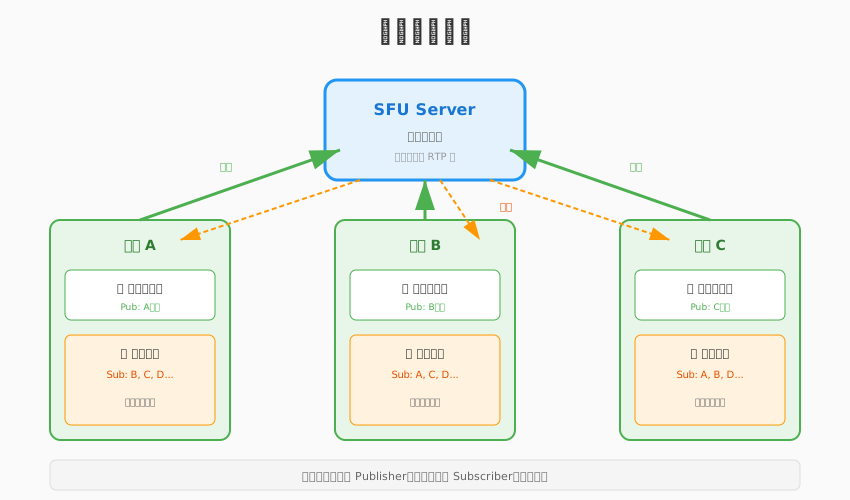
角色定义: - Publisher(发布者):发送音视频流到 SFU - Subscriber(订阅者):从 SFU 接收其他用户的流 - 一个用户可以同时是发布者和订阅者
工作流程:
1. 用户 A 加入房间
   ├── 发布本地音视频(Publisher)
   └── 订阅房间内的其他用户(Subscriber)

2. 用户 B 加入房间
   ├── 发布本地音视频
   └── 订阅用户 A 的流

3. 用户 A 收到通知
   └── 订阅用户 B 的流
1.3 客户端架构设计
┌─────────────────────────────────────────────────┐
│                  UI 层                           │
│  ┌──────────────┐  ┌──────────────────────────┐ │
│  │ 视频网格布局  │  │      控制面板            │ │
│  └──────────────┘  └──────────────────────────┘ │
├─────────────────────────────────────────────────┤
│              业务逻辑层                          │
│  ┌───────────┐  ┌───────────┐  ┌─────────────┐ │
│  │  RoomManager│  │   Layout  │  │ EventHandler│ │
│  └───────────┘  └───────────┘  └─────────────┘ │
├─────────────────────────────────────────────────┤
│              WebRTC 层                           │
│  ┌───────────┐  ┌───────────┐  ┌─────────────┐ │
│  │  PeerConn │  │  TrackMgr │  │  Subscribe  │ │
│  └───────────┘  └───────────┘  └─────────────┘ │
├─────────────────────────────────────────────────┤
│              网络层                              │
│  ┌───────────┐  ┌───────────┐                   │
│  │  Signaling│  │   SFU     │                   │
│  │ (WebSocket)│  │  (RTP)    │                   │
│  └───────────┘  └───────────┘                   │
└─────────────────────────────────────────────────┘核心模块职责:
| 模块 | 职责 |
|---|---|
| RoomManager | 房间生命周期、成员管理 |
| Layout | 视频布局计算、窗口分配 |
| TrackMgr | 音视频轨道管理、设备控制 |
| Subscribe | 订阅管理、带宽分配 |
| EventHandler | 房间事件处理、状态同步 |
2. 多路视频渲染
2.1 视频布局策略
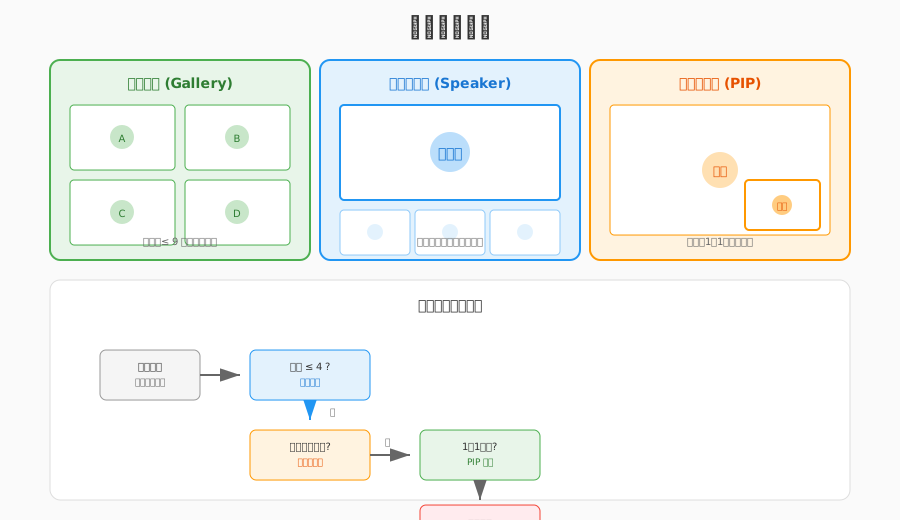
常见布局模式:
1) 网格布局(Gallery View)
┌────────┬────────┬────────┐
│   A    │   B    │   C    │
├────────┼────────┼────────┤
│   D    │   E    │   F    │
└────────┴────────┴────────┘适用:平等会议,所有人可见
2) 主讲人模式(Speaker View)
┌─────────────────────────┐
│                         │
│        主讲人           │
│       (大图)            │
│                         │
├───────┬───────┬─────────┤
│   A   │   B   │   ...   │
└───────┴───────┴─────────┘适用:讲座、培训
3) 画中画模式(PIP)
┌─────────────────────────┐
│                         │
│       主讲人            │
│                         │
│   ┌─────┐               │
│   │自己 │               │
│   └─────┘               │
└─────────────────────────┘适用:自己也需要看到
2.2 布局计算算法
// layout_manager.h
#pragma once

#include <vector>
#include <math>

namespace live {

struct VideoCell {
    int x, y;           // 位置
    int width, height;  // 大小
    std::string user_id; // 用户ID
    bool is_speaking;   // 是否正在说话
};

enum class LayoutMode {
    GRID,       // 网格
    SPEAKER,    // 主讲人
    PIP         // 画中画
};

class LayoutManager {
public:
    LayoutManager(int container_width, int container_height);

    // 设置布局模式
    void SetMode(LayoutMode mode);

    // 计算布局
    std::vector<VideoCell> CalculateLayout(
        const std::vector<std::string>& user_ids,
        const std::string& speaker_id);

    // 获取最佳行列数
    static void GetGridSize(int count, int* rows, int* cols);

private:
    std::vector<VideoCell> CalculateGrid(
        const std::vector<std::string>& user_ids);

    std::vector<VideoCell> CalculateSpeaker(
        const std::vector<std::string>& user_ids,
        const std::string& speaker_id);

    std::vector<VideoCell> CalculatePIP(
        const std::vector<std::string>& user_ids);

    int container_width_;
    int container_height_;
    LayoutMode mode_;
    static constexpr int kMinCellWidth = 200;
    static constexpr int kMinCellHeight = 150;
};

} // namespace live
// layout_manager.cpp
#include "layout_manager.h"
namespace live {
LayoutManager::LayoutManager(int container_width, int container_height)
: container_width_(container_width)
, container_height_(container_height)
, mode_(LayoutMode::GRID) {}
void LayoutManager::SetMode(LayoutMode mode) {
mode_ = mode;
}
std::vector<VideoCell> LayoutManager::CalculateLayout(
const std::vector<std::string>& user_ids,
const std::string& speaker_id) {
switch (mode_) {
case LayoutMode::GRID:
return CalculateGrid(user_ids);
case LayoutMode::SPEAKER:
return CalculateSpeaker(user_ids, speaker_id);
case LayoutMode::PIP:
return CalculatePIP(user_ids);
}
return {};
}
void LayoutManager::GetGridSize(int count, int* rows, int* cols) {
// 计算最接近正方形的行列数
*cols = static_cast<int>(std::ceil(std::sqrt(count)));
*rows = static_cast<int>(std::ceil(static_cast<double>(count) / *cols));
}
std::vector<VideoCell> LayoutManager::CalculateGrid(
const std::vector<std::string>& user_ids) {
std::vector<VideoCell> cells;
int count = static_cast<int>(user_ids.size());
if (count == 0) return cells;
int rows, cols;
GetGridSize(count, &rows, &cols);
// 计算每个单元格大小
int cell_width = container_width_ / cols;
int cell_height = container_height_ / rows;
// 确保最小尺寸
if (cell_width < kMinCellWidth || cell_height < kMinCellHeight) {
// 需要滚动,这里简化处理
cell_width = std::max(cell_width, kMinCellWidth);
cell_height = std::max(cell_height, kMinCellHeight);
}
// 分配位置
for (int i = 0; i < count; ++i) {
VideoCell cell;
cell.user_id = user_ids[i];
cell.col = i % cols;
cell.row = i / cols;
cell.x = cell.col * cell_width;
cell.y = cell.row * cell_height;
cell.width = cell_width;
cell.height = cell_height;
cell.is_speaking = false;
cells.push_back(cell);
}
return cells;
}
std::vector<VideoCell> LayoutManager::CalculateSpeaker(
const std::vector<std::string>& user_ids,
const std::string& speaker_id) {
std::vector<VideoCell> cells;
if (user_ids.empty()) return cells;
// 主讲人占 70% 高度
int main_height = static_cast<int>(container_height_ * 0.7);
int thumb_height = container_height_ - main_height;
// 主讲人
auto speaker_it = std::find(user_ids.begin(), user_ids.end(), speaker_id);
if (speaker_it != user_ids.end()) {
VideoCell main;
main.user_id = speaker_id;
main.x = 0;
main.y = 0;
main.width = container_width_;
main.height = main_height;
main.is_speaking = true;
cells.push_back(main);
}
// 缩略图
int other_count = static_cast<int>(user_ids.size()) - 1;
if (other_count > 0) {
int thumb_width = container_width_ / other_count;
int idx = 0;
for (const auto& user_id : user_ids) {
if (user_id == speaker_id) continue;
VideoCell thumb;
thumb.user_id = user_id;
thumb.x = idx * thumb_width;
thumb.y = main_height;
thumb.width = thumb_width;
thumb.height = thumb_height;
thumb.is_speaking = false;
cells.push_back(thumb);
++idx;
}
}
return cells;
}
} // namespace live2.3 SDL2 多窗口渲染
// multi_video_renderer.h
#pragma once

#include <SDL2/SDL.h>
#include <map>
#include <string>
#include "layout_manager.h"

namespace live {

class MultiVideoRenderer {
public:
    MultiVideoRenderer(int width, int height);
    ~MultiVideoRenderer();

    bool Initialize();
    void Shutdown();

    // 更新布局
    void UpdateLayout(const std::vector<VideoCell>& cells);

    // 渲染视频帧
    void RenderFrame(const std::string& user_id,
                     const uint8_t* y_plane, const uint8_t* u_plane,
                     const uint8_t* v_plane,
                     int y_pitch, int u_pitch, int v_pitch,
                     int width, int height);

    // 渲染所有(包括背景、边框等)
    void Render();

private:
    struct VideoTexture {
        SDL_Texture* texture = nullptr;
        int width = 0;
        int height = 0;
        std::string user_id;
        VideoCell cell;
    };

    SDL_Window* window_ = nullptr;
    SDL_Renderer* renderer_ = nullptr;
    std::map<std::string, VideoTexture> textures_;
    std::vector<VideoCell> current_layout_;

    int container_width_;
    int container_height_;
};

} // namespace live
3. 动态订阅策略
3.1 为什么需要动态订阅?
问题: - 10 人会议,每人发送 2Mbps - 如果订阅所有 9 路流,需要 18Mbps 下行带宽 - 大部分用户没有这么高的带宽
解决方案:动态订阅
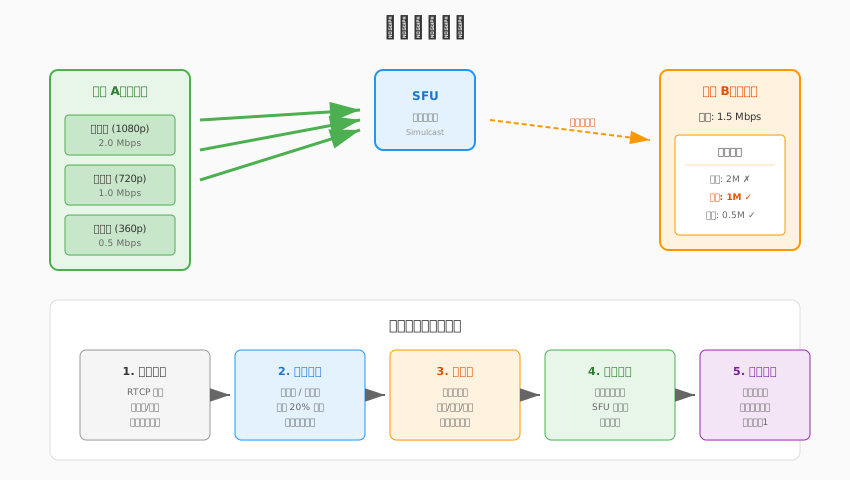
3.2 订阅策略类型
| 策略 | 描述 | 适用场景 |
|---|---|---|
| 全订阅 | 订阅所有参与者的流 | ≤4 人会议 |
| 按需订阅 | 只订阅正在说话的人 | 大型会议 |
| 分页订阅 | 订阅当前页的人 | webinars |
| 分层订阅 | 根据 Simulcast 层选择质量 | 自适应带宽 |
3.3 Simulcast 分层订阅
SFU 支持 Simulcast(分层编码),发送端同时发送多路质量:
发送端:
├── 高清层 (1080p) ──┐
├── 标清层 (720p) ──┼──→ SFU 选择一路转发给订阅者
└── 低清层 (360p) ──┘订阅决策:
enum class SimulcastLayer {
    HIGH,   // 1080p, 2Mbps
    MEDIUM, // 720p, 1Mbps
    LOW     // 360p, 0.5Mbps
};

class SubscriptionManager {
public:
    // 根据带宽和窗口大小选择层
    SimulcastLayer SelectLayer(
        int available_bandwidth,  // kbps
        int video_width,          // 渲染窗口宽度
        const std::string& user_id
    ) {
        // 1. 带宽检查
        if (available_bandwidth < 600) {
            return SimulcastLayer::LOW;
        } else if (available_bandwidth < 1200) {
            return SimulcastLayer::MEDIUM;
        }

        // 2. 窗口大小检查
        if (video_width < 480) {
            return SimulcastLayer::LOW;
        } else if (video_width < 960) {
            return SimulcastLayer::MEDIUM;
        }

        return SimulcastLayer::HIGH;
    }

    // 订阅指定层
    void SubscribeLayer(const std::string& user_id, SimulcastLayer layer);

    // 取消订阅
    void Unsubscribe(const std::string& user_id);

private:
    struct Subscription {
        std::string user_id;
        SimulcastLayer current_layer;
        bool audio_enabled;
        bool video_enabled;
    };

    std::map<std::string, Subscription> subscriptions_;
    int total_bandwidth_used_ = 0;
    static constexpr int kBandwidthReserve = 200; // 保留 200kbps
};
3.4 带宽自适应
class BandwidthEstimator {
public:
    // 基于 RTCP Receiver Report 估计带宽
    void OnReceiverReport(const ReceiverReport& rr);

    // 获取估计带宽 (kbps)
    int GetEstimatedBandwidth() const {
        return estimated_bandwidth_;
    }

    // 检测拥塞
    bool IsCongested() const {
        return packet_loss_rate_ > 0.05; // 5% 丢包视为拥塞
    }

private:
    int estimated_bandwidth_ = 2000; // 初始估计 2Mbps
    float packet_loss_rate_ = 0.0;
    int rtt_ms_ = 50;

    // 指数移动平均系数
    static constexpr float kAlpha = 0.8;
};

void BandwidthEstimator::OnReceiverReport(const ReceiverReport& rr) {
    // 更新丢包率
    packet_loss_rate_ = rr.fraction_lost / 255.0f;

    // 基于丢包调整带宽估计
    if (packet_loss_rate_ > 0.1) {
        // 严重拥塞,大幅降低
        estimated_bandwidth_ = static_cast<int>(
            estimated_bandwidth_ * 0.7);
    } else if (packet_loss_rate_ > 0.02) {
        // 轻微拥塞,适当降低
        estimated_bandwidth_ = static_cast<int>(
            estimated_bandwidth_ * 0.9);
    } else {
        // 网络良好,可以尝试增加
        estimated_bandwidth_ = static_cast<int>(
            estimated_bandwidth_ * 1.05);
    }

    // 限制范围
    estimated_bandwidth_ = std::clamp(estimated_bandwidth_, 200, 10000);
}
4. 房间事件处理
4.1 房间状态模型
Room State:
├── room_id: string
├── local_user: UserInfo
├── remote_users: Map<user_id, UserInfo>
├── connections: Map<user_id, PeerConnection>
└── layout: LayoutState

UserInfo:
├── user_id: string
├── nickname: string
├── has_audio: bool
├── has_video: bool
├── is_speaking: bool
├── is_screen_sharing: bool
└── join_time: timestamp
4.2 事件类型
| 事件 | 描述 | 处理动作 |
|---|---|---|
user-joined |
新用户加入 | 创建订阅、添加视频格子 |
user-left |
用户离开 | 关闭订阅、移除视频格子 |
stream-added |
用户发布流 | 订阅流、绑定渲染 |
stream-removed |
用户停止发布 | 取消订阅 |
audio-status-changed |
音频开关 | 更新 UI 状态 |
video-status-changed |
视频开关 | 更新 UI 状态 |
speaking-changed |
说话状态 | 高亮显示 |
active-speaker |
当前主讲人 | 切换布局 |
4.3 事件处理器实现
// room_event_handler.h
#pragma once

#include <functional>
#include <json/json.h>

namespace live {

enum class RoomEventType {
    USER_JOINED,
    USER_LEFT,
    STREAM_ADDED,
    STREAM_REMOVED,
    AUDIO_STATUS_CHANGED,
    VIDEO_STATUS_CHANGED,
    SPEAKING_CHANGED,
    ACTIVE_SPEAKER_CHANGED,
    CONNECTION_STATE_CHANGED,
    ERROR
};

struct RoomEvent {
    RoomEventType type;
    std::string user_id;
    Json::Value data;
};

class RoomEventHandler {
public:
    using EventCallback = std::function<void(const RoomEvent&)>;

    void RegisterCallback(RoomEventType type, EventCallback callback);
    void HandleEvent(const RoomEvent& event);

    // 具体事件处理
    void OnUserJoined(const std::string& user_id, const Json::Value& user_info);
    void OnUserLeft(const std::string& user_id);
    void OnStreamAdded(const std::string& user_id, const std::string& stream_type);
    void OnStreamRemoved(const std::string& user_id);
    void OnSpeakingChanged(const std::string& user_id, bool is_speaking);
    void OnActiveSpeakerChanged(const std::string& user_id);

private:
    std::map<RoomEventType, std::vector<EventCallback>> callbacks_;
};

} // namespace live
// room_event_handler.cpp
#include "room_event_handler.h"
namespace live {
void RoomEventHandler::RegisterCallback(RoomEventType type,
EventCallback callback) {
callbacks_[type].push_back(callback);
}
void RoomEventHandler::HandleEvent(const RoomEvent& event) {
auto it = callbacks_.find(event.type);
if (it != callbacks_.end()) {
for (const auto& callback : it->second) {
callback(event);
}
}
}
void RoomEventHandler::OnUserJoined(const std::string& user_id,
const Json::Value& user_info) {
RoomEvent event;
event.type = RoomEventType::USER_JOINED;
event.user_id = user_id;
event.data = user_info;
HandleEvent(event);
LOG_INFO("User joined: %s, nickname: %s",
user_id.c_str(),
user_info["nickname"].asString().c_str());
}
void RoomEventHandler::OnUserLeft(const std::string& user_id) {
RoomEvent event;
event.type = RoomEventType::USER_LEFT;
event.user_id = user_id;
HandleEvent(event);
LOG_INFO("User left: %s", user_id.c_str());
}
void RoomEventHandler::OnSpeakingChanged(const std::string& user_id,
bool is_speaking) {
RoomEvent event;
event.type = RoomEventType::SPEAKING_CHANGED;
event.user_id = user_id;
event.data["is_speaking"] = is_speaking;
HandleEvent(event);
LOG_DEBUG("User %s speaking state: %s",
user_id.c_str(), is_speaking ? "true" : "false");
}
void RoomEventHandler::OnActiveSpeakerChanged(const std::string& user_id) {
RoomEvent event;
event.type = RoomEventType::ACTIVE_SPEAKER_CHANGED;
event.user_id = user_id;
HandleEvent(event);
LOG_INFO("Active speaker changed to: %s", user_id.c_str());
}
} // namespace live4.4 信令消息格式
// 用户加入通知
{
  "type": "user-joined",
  "user_id": "user_123",
  "nickname": "张三",
  "timestamp": 1699000000000
}

// 流发布通知
{
  "type": "stream-added",
  "user_id": "user_123",
  "stream_id": "stream_456",
  "audio": true,
  "video": true,
  "simulcast": ["high", "medium", "low"]
}

// 说话检测通知
{
  "type": "speaking-changed",
  "user_id": "user_123",
  "is_speaking": true,
  "audio_level": 0.75
}

// 订阅请求
{
  "type": "subscribe",
  "target_user_id": "user_123",
  "audio": true,
  "video": true,
  "layer": "medium"
}
5. 音频管理
5.1 客户端音频混音
多人会议中,如果同时播放多个远端音频,需要混音处理:
class AudioMixer {
public:
    // 添加音频源
    void AddSource(const std::string& user_id);

    // 移除音频源
    void RemoveSource(const std::string& user_id);

    // 输入音频帧
    void PushAudio(const std::string& user_id,
                   const int16_t* pcm_data,
                   int samples);

    // 获取混音后的音频
    void GetMixedAudio(int16_t* output, int samples);

private:
    struct AudioSource {
        std::queue<std::vector<int16_t>> buffer;
        float volume = 1.0f;
        bool muted = false;
    };

    std::map<std::string, AudioSource> sources_;
    std::mutex mutex_;
};

void AudioMixer::GetMixedAudio(int16_t* output, int samples) {
    std::lock_guard<std::mutex> lock(mutex_);

    // 清零输出
    std::fill(output, output + samples, 0);

    // 混音
    for (auto& [user_id, source] : sources_) {
        if (source.muted || source.buffer.empty()) continue;

        auto& frame = source.buffer.front();
        int frame_samples = static_cast<int>(frame.size());
        int mix_samples = std::min(samples, frame_samples);

        for (int i = 0; i < mix_samples; ++i) {
            // 简单叠加(实际需要溢出处理)
            int32_t sum = output[i] + static_cast<int32_t>(
                frame[i] * source.volume);
            output[i] = static_cast<int16_t>(
                std::clamp(sum, -32768, 32767));
        }

        source.buffer.pop();
    }
}
5.2 音量检测(VU Meter)
class VolumeDetector {
public:
    // 计算音频帧的 RMS 音量
    float CalculateVolume(const int16_t* pcm_data, int samples) {
        double sum_squares = 0.0;
        for (int i = 0; i < samples; ++i) {
            sum_squares += pcm_data[i] * pcm_data[i];
        }
        double rms = std::sqrt(sum_squares / samples);

        // 归一化到 0-1
        return static_cast<float>(
            std::min(rms / 32768.0, 1.0));
    }

    // 检测是否正在说话(阈值检测)
    bool IsSpeaking(const int16_t* pcm_data, int samples) {
        float volume = CalculateVolume(pcm_data, samples);

        // 应用平滑
        smoothed_volume_ = smoothed_volume_ * 0.8f + volume * 0.2f;

        // 迟滞比较,避免抖动
        if (smoothed_volume_ > kSpeakingThreshold) {
            is_speaking_ = true;
        } else if (smoothed_volume_ < kSpeakingThreshold * 0.7f) {
            is_speaking_ = false;
        }

        return is_speaking_;
    }

private:
    float smoothed_volume_ = 0.0f;
    bool is_speaking_ = false;
    static constexpr float kSpeakingThreshold = 0.05f;
};
6. 本章总结
6.1 核心概念回顾
多人会议客户端技术栈:

┌─────────────────────────────────────────┐
│  布局管理(网格/主讲人/PIP)              │
├─────────────────────────────────────────┤
│  动态订阅(Simulcast 层选择)             │
├─────────────────────────────────────────┤
│  带宽自适应(RTCP 反馈)                  │
├─────────────────────────────────────────┤
│  事件处理(用户/流/状态)                 │
├─────────────────────────────────────────┤
│  音频混音 + 音量检测                      │
├─────────────────────────────────────────┤
│  WebRTC 连接管理                          │
└─────────────────────────────────────────┘
6.2 关键学习点
- 发布/订阅模型:灵活控制接收哪些流
- 动态布局:根据人数和模式自动调整
- 带宽管理:Simulcast + 自适应层选择
- 事件驱动:房间状态变化及时响应
- 音频处理:混音 + 说话检测
6.3 与下一章的衔接
本章完成了客户端的多人会议功能。但要支持更多用户(如 100+ 人),单靠 SFU 还不够,需要考虑 MCU 混音混画 来降低下行带宽。
下一章 MCU 混音混画详解 将介绍服务端如何混合多路音视频,让每个人都能以较低带宽观看统一画面。
课后思考
布局算法优化:当用户超过 16 人时,网格布局需要分页或滚动。如何设计合理的分页策略?
带宽分配:假设总带宽 2Mbps,房间内 6 个远端用户,如何分配每个人的订阅质量?是平均分配还是按需分配?
说话检测延迟:说话检测通常有 100-200ms 的检测延迟,如何让用户感知不到切换主讲人的延迟?
音频混音性能:10 人会议意味着 10 路音频混音。如何优化混音算法以降低 CPU 占用?(提示:只混活跃说话者)